> For the complete documentation index, see [llms.txt](https://docs.geosamples.org/llms.txt). Markdown versions of documentation pages are available by appending `.md` to page URLs; this page is available as [Markdown](https://docs.geosamples.org/api/authentication.md).
# Authentication
Authenticate API requests with a JWT from Developer Settings.
SESAR API writes need a JWT **access token** in the `Authorization` header. You mint an access token and a **refresh token** from Developer Settings while you are signed in. Use the access token on requests; use the refresh token only to rotate a new pair.
You need **upload permission** on your SESAR account to generate tokens.
## Get a JWT from Developer Settings
{% stepper %}
{% step %}
### Open Developer Settings
Open your user menu and choose **Developer Settings**, or go directly to [Developer Settings](https://app.geosamples.org/profile/developer-settings).
{% endstep %}
{% step %}
### Generate a token pair
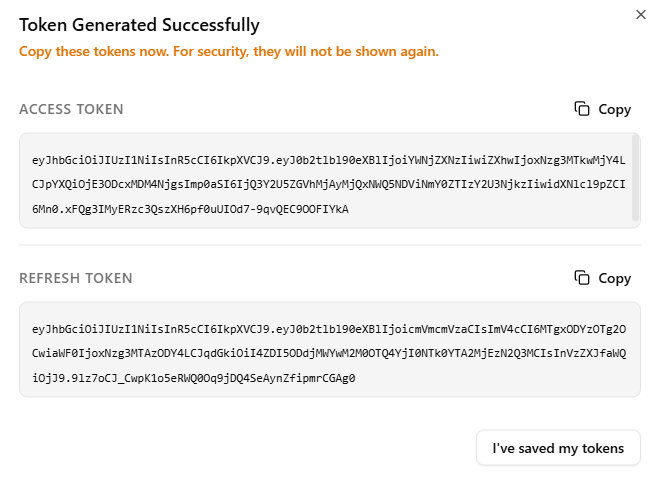
Choose **Generate New Token**. SESAR shows an **access token** and a **refresh token** once. Copy both now — they are not shown again.
{% endstep %}
{% endstepper %}
{% hint style="warning" %}
Treat the refresh token like a password. Anyone who has it can mint new access tokens for your account.
{% endhint %}
You can have up to **five** active developer token pairs. Generating a sixth pair revokes the oldest one. Access tokens last **one day**. Refresh tokens last **one year** and rotate when you use them.
## Add the access token to the Authorization header
Send the **access token** (not the refresh token) on every authenticated request:
```
Authorization: Bearer
```
The scheme must be `Bearer`. Do not use `Token`.
{% code title="Example request" %}
```bash
curl -H "Authorization: Bearer ACCESS_TOKEN" \
"https://api.geosamples.org/api/users/me/"
```
{% endcode %}
When the access token expires, rotate the pair with the refresh token instead of generating a new pair from Developer Settings.
## Rotate tokens with the API
`POST /api/auth/token/refresh/` exchanges a valid refresh token for a **new** access token and a **new** refresh token. The old refresh token is revoked immediately. This request does not need an `Authorization` header.
{% code title="Rotate a token pair" %}
```bash
curl -X POST "https://api.geosamples.org/api/auth/token/refresh/" \
-H "Content-Type: application/json" \
-d '{"refresh": "REFRESH_TOKEN"}'
```
{% endcode %}
A successful response looks like:
```json
{
"data": {
"refresh": "NEW_REFRESH_TOKEN",
"access": "NEW_ACCESS_TOKEN"
}
}
```
Store the new refresh token and use the new access token in `Authorization: Bearer …`. If you keep using the old refresh token, the API returns `401` with `Invalid or expired refresh token.`
## Revoke tokens
On Developer Settings, **Revoke All Active JWTs** blacklists every developer refresh token for your account (tokens issued for a named integration connection are left alone).
From the API, with a still-valid access token:
```bash
curl -X DELETE "https://api.geosamples.org/api/auth/token/blacklist-all/" \
-H "Authorization: Bearer ACCESS_TOKEN"
```
To revoke a single refresh token without signing in:
```bash
curl -X POST "https://api.geosamples.org/api/auth/token/blacklist/" \
-H "Content-Type: application/json" \
-d '{"refresh": "REFRESH_TOKEN"}'
```
---
# Agent Instructions
This documentation is published with GitBook. GitBook is the documentation platform designed so that both humans and AI agents can read, navigate, and reason over technical content effectively. Learn more at gitbook.com.
## Querying This Documentation
If you need additional information that is not directly available in this page, you can query the documentation by asking a question.
Perform an HTTP GET request on the following URL with the `ask` and `goal` query parameters:
```
GET https://docs.geosamples.org/api/authentication.md?ask=&goal=
```
`ask` is the immediate question: it should be specific, self-contained, and written in natural language.
`goal` is what the user is ultimately trying to achieve, the reason they need the answer. Sharing it helps GitBook give you a better, more relevant answer. A goal is most helpful when it describes the outcome the user wants rather than restating the question. For example, with `ask=how do I create an API token`, a goal like `automate deployments from our CI pipeline` lets GitBook tailor the answer to that use case.
The response will contain a direct answer to the question and relevant excerpts and sources from the documentation.
Use this mechanism when the answer is not explicitly present in the current page, you need clarification or additional context, or you want to retrieve related documentation sections.